
How to Run Our HTML Code using Live Server and HTML Tags
Running HTML Code in VS Code using Live Server
🔹 Step 1: Open VS Code
🔹 Step 2: Create a new file → index.html
🔹 Step 3: Add this simple HTML code: 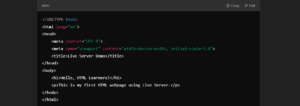
🔹 Step 4: Right-click on index.html → Click “Open with Live Server”
🔹 Step 5: Your browser will automatically open with the HTML page!
HTML Headings (<h1> to <h6>)
Headings are used to define titles & subheadings in a webpage.
Example:
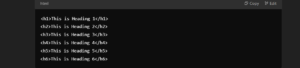
💡 <h1> is the largest & <h6> is the smallest!
HTML Paragraph (<p>)
The <p> tag is used to write text content in a webpage.
Example

Paragraphs automatically add spacing for better readability!
Quick Practice Task!
Copy & paste this code in index.html, save, and run it using Live Server:
<!DOCTYPE html>
<html lang="en">
<head>
    <meta charset="UTF-8">
    <meta name="viewport" content="width=device-width, initial-scale=1.0">
    <title>Headings & Paragraphs</title>
</head>
<body>
    <h1>Welcome to HTML!</h1>
    <p>HTML is the building block of the web.</p>

    <h2>Headings Example</h2>
    <p>Headings help structure your content.</p>
</body>
</html>
👉 Follow me on Instagram for daily web development tips! INSTAGRAM
View my Previous Post – Top 15 Patterns